
Coupons
⏱ ~5 min read · create a discount code, set its type, scope, expiry, and limits, then track redemptions on the order.
In short. Coupons are the discount codes your customers type at checkout. Each one has a code, a discount type (percentage, fixed amount, or free shipping), a scope (the whole cart, specific products, or specific categories), an optional expiry date, and usage limits — a total cap and a per-customer cap. When a code is redeemed, the count climbs and the order keeps a reference to it for your records. The Coupons area lives in your store's admin, and the store module must be turned on for your site.
On this page: Where to find it · The coupon record · Create a coupon · Discount types · Scope targeting · Redemption tracking · Manage existing coupons · Worked examples · Troubleshooting · Vocabulary
Where to find it
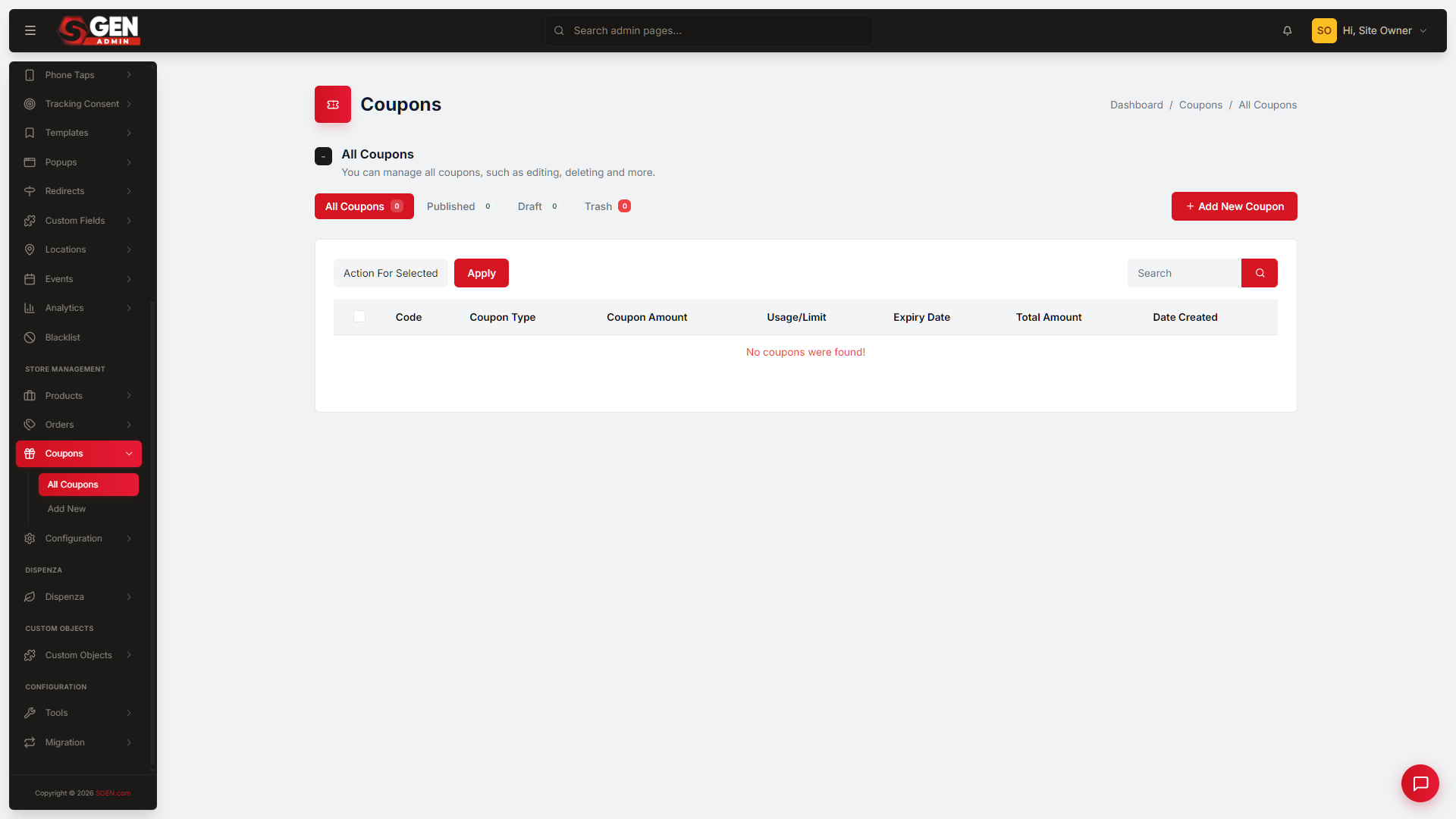
Sign in to your SGEN dashboard, open Site Manager, find your site, and choose Manage site → Login to staging (or live). In your site's admin, choose Coupons in the store-management group of the sidebar. You'll land on the coupon list — every coupon on the site, with its code, type, scope, expiry, usage, and status.
The store module must be enabled for your site. If Coupons is missing, an admin can turn it on in Modules Config.
The coupon record
A coupon is a discount rule. Each record carries:
| Field | What it controls |
|---|---|
| Code | The string customers enter at checkout (case-insensitive) |
| Discount type | Percentage / fixed amount / free shipping |
| Discount value | The number for the type — e.g., 20 for 20% or 10 for $10 off |
| Scope | Entire cart / specific products / specific categories |
| Expiry | Date after which the coupon stops working (or none) |
| Usage limit — total | Maximum redemptions across all customers |
| Usage limit — per customer | Maximum redemptions per customer |
| State | Active / expired / disabled |
Create a coupon
From the Coupons list, click Add New (usually top-right) to open the New Coupon screen. Fill in the details — code, discount type and value, scope, optional expiry, and any usage limits — then save. The new coupon appears in the list and is live for customers as soon as it's saved and active.
Tip: keep codes short, memorable, and uppercase (the platform matches them case-insensitively, so customers don't have to). A clear code like LAUNCH20 reads better in emails than a random string.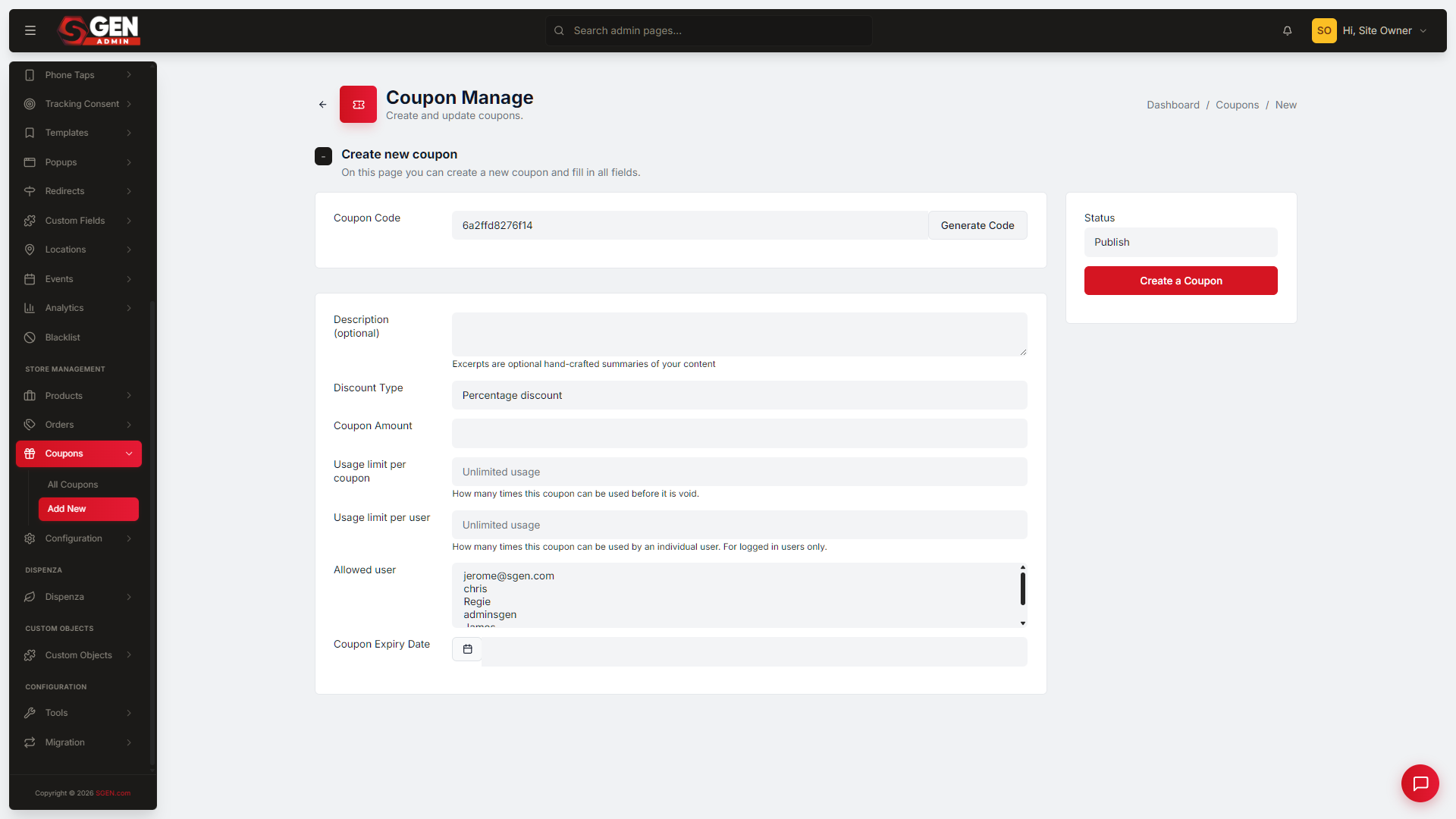
Discount types
| Type | Behavior |
|---|---|
| Percentage | Applies N% off the scoped subtotal |
| Fixed amount | Applies a flat $N off the scoped subtotal |
| Free shipping | Overrides shipping cost to zero (typically gated by minimum cart value) |
Scope targeting
| Scope | What it covers |
|---|---|
| Entire cart | Discount applies to the cart subtotal across all products |
| Specific products | Discount applies only when the cart contains the named products (or any subset) |
| Specific categories | Discount applies to products in the named categories |
For scoping to specific products, see Products. Redemption records appear in Orders.
Redemption tracking
When a coupon is redeemed at checkout:
- The coupon record's usage count increments.
- The order record carries the coupon reference for audit.
- Per-customer limits enforce against subsequent orders from the same customer.
This is what lets you see, at a glance in the list, how a campaign is performing — a high usage count against an unlimited cap tells you the code is landing; a count stalled at zero tells you it isn't reaching anyone.
Manage existing coupons
The Coupons list is also where you maintain campaigns over time.
- Edit a coupon by opening it from the list — change the value, extend or set an expiry, or adjust limits. Changes take effect immediately for new redemptions.
- Duplicate a coupon to reuse one as a starting point: look for a Duplicate or Copy action in the row menu. If the action isn't present, create a new coupon and copy the details across.
- Act in bulk by ticking the checkboxes next to the coupons you want (or the master checkbox to select all), choosing from the Action For Selected dropdown, and clicking Apply — the fastest way to retire a batch of expired codes at once.
Worked examples
| Goal | What you do |
|---|---|
| Launch a percentage promo | Add New → code LAUNCH20 → Percentage → 20 → Entire cart → set a 30-day expiry → leave usage uncapped → Save. Distribute by email; watch the usage count climb. |
| Category sale | Add New → code SPRING10 → Percentage → 10 → scope to the Spring category → Save. The discount applies only when the cart contains Spring-category products. |
| Cap a VIP offer | Add New → set the total usage limit to 100. On the 101st attempt the code is rejected and the order proceeds at full price. |
| Free shipping over a threshold | Add New → Free shipping type → gate by a minimum cart value → set an expiry → Save. |
| Reuse a past campaign | Duplicate last quarter's coupon from the row menu, then edit the code and expiry on the copy. |
Troubleshooting
- The Coupons area won't load. Confirm you're signed in as a site admin and on the right site (staging vs live). If the store feature is off, turn it on in Modules Config, then refresh and retry.
- A code is rejected at checkout. Check the coupon's state (active, not expired or disabled), its expiry date, and whether a usage cap — total or per-customer — has already been reached.
- The discount applied to the wrong items. Review the coupon's scope. A category- or product-scoped coupon only discounts matching items, not the whole cart.
- There's no Duplicate action. Not every coupon offers one — create a new coupon and copy the details from the original instead.
Vocabulary
| Term | Definition |
|---|---|
| Coupon | One discount-rule record |
| Code | The string customers enter at checkout |
| Scope | What the discount applies to — cart, products, or categories |
| Usage limit | Per-coupon total cap or per-customer cap |
| Redemption | One successful application of the coupon to an order |
Related
- SG-Admin Overview — parent surface
- Products — products that coupons can scope to
- Orders — redemption records
- Ecommerce Blocks — the Coupon Entry block customers interact with at checkout