
Understanding Staging and Live in SGEN
⏱ ~2 min answer below · full page ≈ 7 min · skim the bold lead-ins to move faster.
In short. Every SGEN site has two independent environments from the moment it is provisioned: staging (your working copy — available immediately) and live (the public site — ready once DNS is pointed and a certificate is issued). Changes on one environment don't carry to the other automatically; you move work by running the promote-to-live action. That's the whole model — read on for the details.
On this page: At a glance · How it works — step by step · Troubleshooting · Promote in detail · Site lifecycle states · Workflows · FAQ
At a glance
Open SG-Dashboard → Site Manager to see both environments per site.
Not what you need? Access workflow → How to Access Staging and Live in SGEN · Domain setup → How to Point Your Domain in SGEN · State labels → How to Interpret Live vs Maintenance or Unavailable States in SGEN
How staging and live work
Steps — Use the two-environment model
1. Recognize the two-environment model
Every SGEN site has staging and live provisioned together. The two are independent stacks — each has its own database, file storage, URL, and state. Changes in one do not automatically appear in the other.
Staging is the working environment. Build pages, configure settings, test forms without affecting public visitors. Live is the production environment — the version real visitors reach at the site's public domain.
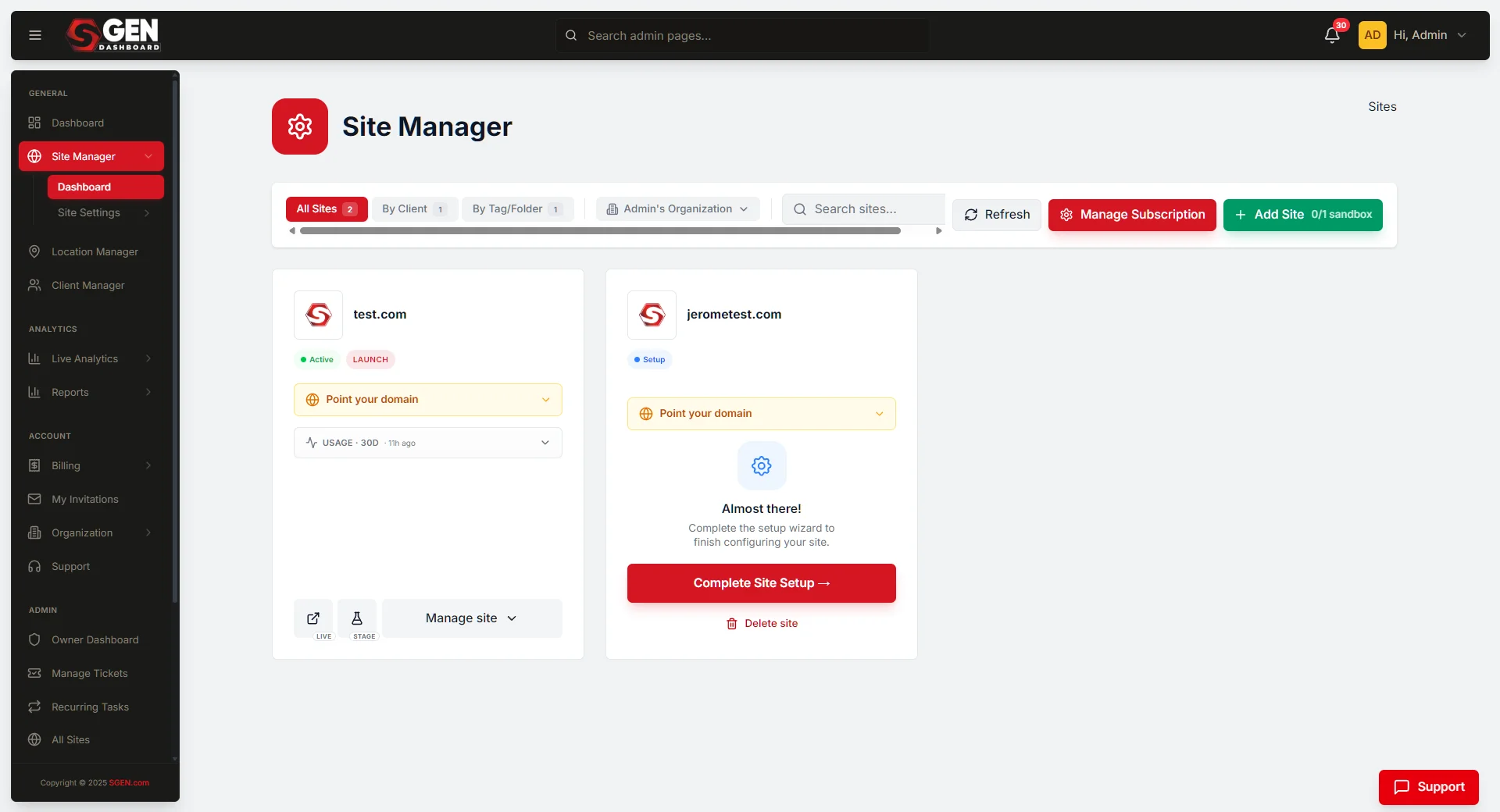
The Site Manager card for a newly provisioned site:
2. Use staging from day one
Staging is available immediately — no DNS or SSL required. From Site Manager, View Staging Site opens the staging build; Login to Stage opens the admin already logged in.
3. Wait for live readiness
Live readiness depends on two conditions that run in sequence — one operator action, three automated steps:
Site Manager identifies which step is pending — most domain readiness issues trace back to Step A (an incorrect or missing DNS record at the registrar).
4. Move work from staging to live
Once live is ready, move work using one of three mechanisms:
- Promotion — takes the staging state and applies it to live in one step. Records, templates, components, media references, and configuration all carry over. (Form submissions and per-environment credentials stay on their respective environments.)
- Direct edit on live — once live is the production target, editing live directly is fine for routine content updates.
- Restore from backup — resets an environment from any backup; this is the recovery path, not the standard promotion path.
Before a promote runs, the prior live state is preserved as a backup snapshot. Restoring from that snapshot returns live to the pre-promote state; the retention window depends on your plan.
5. Maintain the separation
After the initial promotion, staging and live diverge. Quick content updates often go directly on live; riskier changes — design rebuilds, structural changes — usually start on staging, get reviewed, and then promote.
Troubleshooting
| Symptom | Likely cause | Fix |
|---|---|---|
| Site appears in staging but not at the domain | DNS or SSL not yet complete | Check live status in Site Manager — it shows which step is pending |
| Staging changes aren't appearing on live | Expected — environments are independent | Run promote-to-live |
| Login fails on live but works on staging | Environments have separate session state | Use the per-environment login in Site Manager |
| Staging feels slow or shows errors | Staging shares fewer resources by design | Persistent errors → support; intermittent slowness is expected |
| Promote-to-live action not visible | Live not ready yet, or your role doesn't include promote rights | Check live status first; check role assignment second |
| Live shows "Unavailable" | DNS not propagated, certificate not issued, or both | Check Site Manager for the specific signal |
Best practices
- Use staging for the build phase. Don't work on live before staging settles.
- Watch Site Manager for live readiness state rather than guessing.
- Promote deliberately — not on every staging save.
- Keep credentials distinct — staging and live are separate logins.
- After promotion, decide per-change whether subsequent edits go on staging or live.
Promote action in detail
What promotes: records (Pages, Posts, Custom Object instances), templates, components, configuration, media references.
What doesn't promote automatically: form submissions captured on staging, per-environment configuration that's intentionally divergent (different analytics IDs, different integration credentials), session data.
Conflict resolution: when a record exists on both staging and live and both have changed since the last promote, the default is to favor the staging version. Operators can configure conflict resolution per record class for finer-grained control.
Promote frequency: most teams promote infrequently — once at launch, then per major release. Day-to-day content updates often happen directly on live. Manual frequent promotes tend to introduce coordination overhead.
Site states across the lifecycle
| State | What it means |
|---|---|
| Newly provisioned | Staging ready; live waiting on DNS and certificate |
| Live ready, no domain | Live runs on an SGEN-provided URL — some teams use this for internal preview |
| Domain pointed, certificate pending | DNS resolves to SGEN; certificate not yet issued — visitors get a temporary error (usually brief) |
| Fully live | DNS pointed, certificate issued, public traffic served — steady state |
| Maintenance | Operator- or platform-triggered maintenance window; live shows a maintenance message |
| Suspended | Account or plan-level issue suspends live serving — resolution depends on the underlying cause |
Reading state correctly: Site Manager is the authoritative source. When state appears off (live not loading when Site Manager says ready), clearing the visitor's DNS cache or checking from a different network usually reveals whether the issue is propagation lag or something deeper.
Common workflows
| Pattern | Who it suits | How it works |
|---|---|---|
| Build-on-staging (default) | Small teams | All build work on staging → promote once at launch → content updates go direct on live; structural changes return to staging |
| Always-staging | Teams that want a strong review gate | Every change starts on staging, reviewed, then promoted |
| Direct-on-live | High-velocity content teams | Content updates on live; staging used only for risky structural work |
| Branched-staging | Plans that support multiple staging environments | Multiple staging configs (e.g. "next release", "prototype") running in parallel |
A useful starting point: build-on-staging for the first launch, then direct-on-live for routine content with returns to staging for risky changes.
Common questions
Why two environments? To give operators a controlled place to work before changes affect public visitors. Mistakes happen on staging where they don't matter; the work that reaches live has been seen first.
Are staging and live always identical? They start identical when provisioned, then diverge based on what operators do on each.
How long does live readiness take? Once DNS is correctly pointed, certificate issuance is usually minutes. The bottleneck is DNS propagation, which depends on the registrar and prior DNS state.
Can visitors reach the staging URL? The staging URL is reachable to anyone who has it, but it doesn't appear in search results and isn't linked from the live site.
Does staging traffic count against my plan? Staging traffic is generally not counted against the plan's traffic allowance. Live traffic is. Check your specific plan terms.
Can I promote a single page rather than everything? Yes — the platform supports per-record selective promote.
What happens if I delete a record on live? It moves to trash on live; staging is unaffected.
Why not Git-style branching? SGEN's model is simpler — one staging branch alongside one live branch, with a promote action between them. This fits most operator workflows. Teams that need parallel branches usually have engineering operators on staff and can model that workflow externally.