
Agency Client Routing in SGEN
Running multiple client sites from one SGEN account is a deliberate operational model, not just a folder structure. The agency tier adds client-level billing isolation, white-label admin chrome, per-client domain configuration, and cross-client reporting — all managed from a single SG-Dashboard surface. This guide explains when agency tier is the right choice and how to configure each feature.
One dashboard, every client
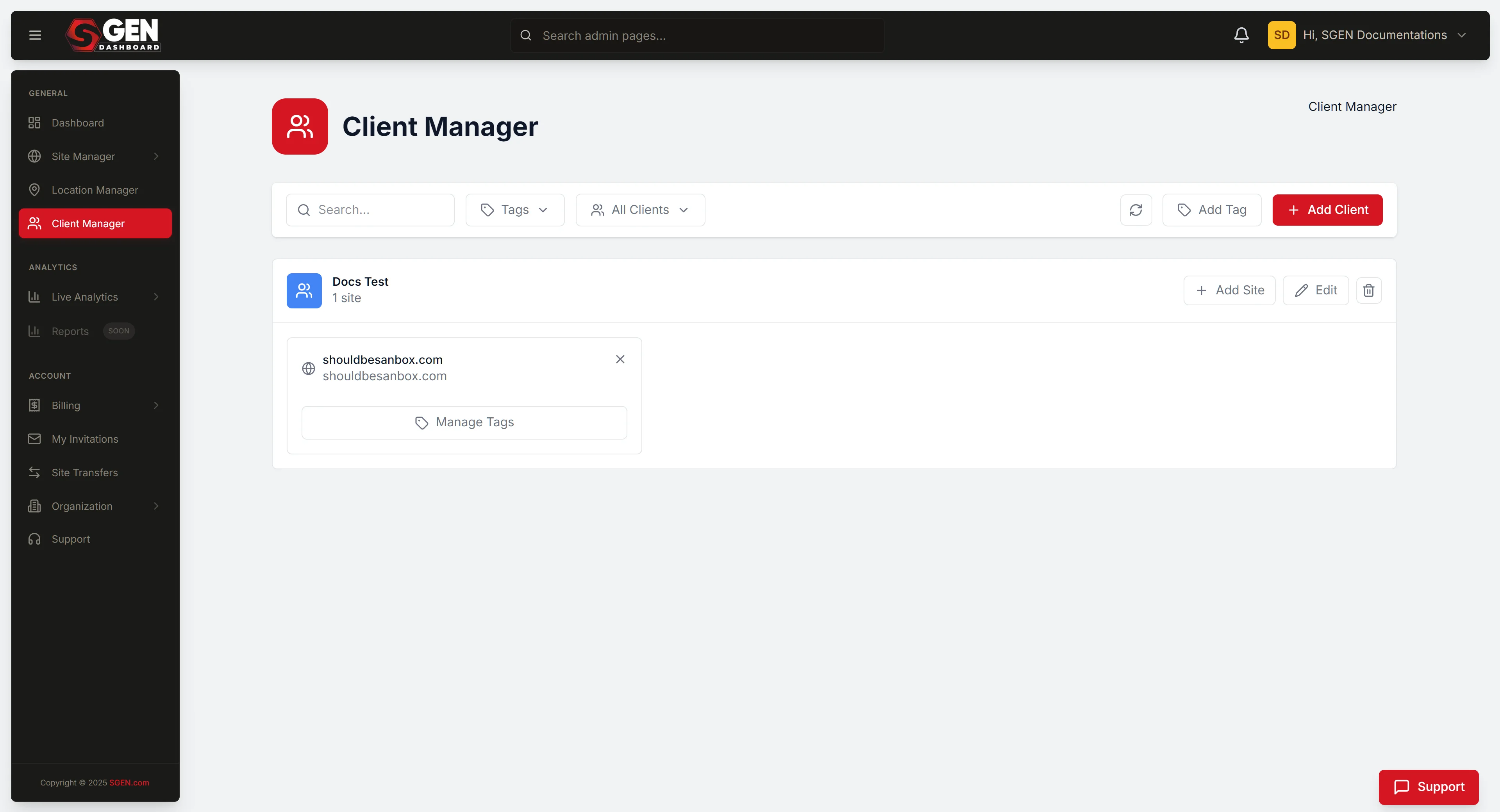
Client Manager in SG-Dashboard lists every client account the agency administers — subscription state, site count, and billing health in one view.
Agency tier adds isolation
Standard multi-site shares billing and branding. Agency tier layers on per-client billing isolation, white-label admin chrome, and cross-client analytics.
Client ownership is a decision, not a default
Agency-tier sites live under the agency's account. If a client needs to own their account outright from day one, set up an independent SGEN account for them instead.
Where to start: Client Manager
Open SG-Dashboard and click Client Manager in the left sidebar. Client Manager lists every client account the agency administers. Each entry shows the client's site count, subscription state, and a link to open their account. If Client Manager does not appear in the sidebar, the account is not on an agency-tier plan — check Account, then Billing, and contact your SGEN account manager to upgrade.
Before you start
Three things to confirm before configuring agency client routing for a new client.
Plan
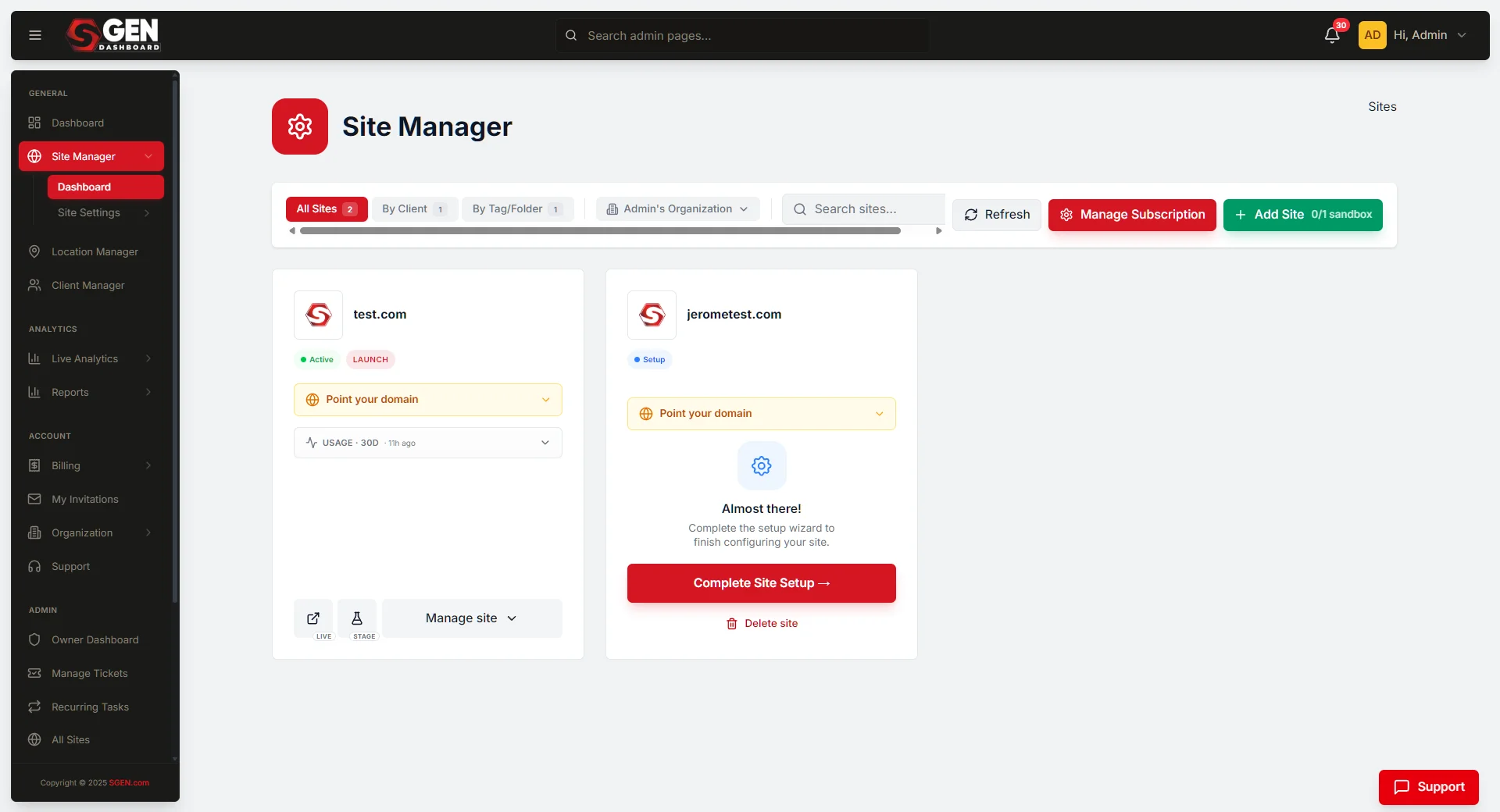
Confirm agency-tier access
Standard multi-site plans do not include client-level billing isolation, white-label admin, or cross-client reporting. Verify your plan in SG-Dashboard under Account, then Billing. Agency-tier options in the billing panel confirm access.
Billing
Gather per-client billing details
Billing isolation requires knowing the plan each client is on and the email address that should receive their billing communications. Collect this before starting configuration — you cannot save billing settings without a billing contact email.
Ownership
Decide the ownership model upfront
Agency-tier sites live under the agency's account. If a client relationship ends and the client needs to take the site with them, transferring ownership requires coordination with SGEN. Decide the ownership model before adding the client — it affects which setup path to take.
Scope
Not every client needs every feature
White-label admin and billing isolation are toggled per client. Apply them only where they add real value for the client relationship — not every client needs a white-label panel or a separate invoice.
Configure agency client routing
Six steps to set up a client account end to end: create the account, configure billing, set white-label branding, connect the domain, enable cross-client reporting, and confirm the routing path back into each client's site.
1
Create or link a client account
In Client Manager, click Add Client. Choose Create a new client site if the client is new to SGEN — fill in the client name, primary contact email, and site details, and SGEN creates the site under the agency account. Choose Link existing SGEN account if the client already has a SGEN account and is granting the agency administrative access — enter their account identifier or email, and the client receives a linking request to confirm. For both paths, decide at this step which agency-tier features to enable: white-label admin and billing isolation are toggled per client here.
2
Configure client-level billing isolation
Click the client's name in Client Manager, then click Billing in the client account panel. Set the plan the client is on, the billing contact email, and the billing arrangement. In a direct arrangement, SGEN invoices the client's billing contact directly. In a pass-through arrangement, SGEN invoices the agency and the agency re-invoices the client. Both show the same subscription state in Client Manager — the distinction only matters at invoice time. Annual billing applies a 15% discount.
3
Configure white-label admin chrome
Open the client account in Client Manager, go to Settings, then Branding. Upload the agency logo (PNG or SVG, recommended 160 x 40px for the top bar). Enter the agency name as it should appear in the admin panel's top bar and page titles. Optionally set a custom admin domain (for example, admin.yourfirm.com/client-a) — this requires a DNS CNAME record pointing the agency's subdomain to SGEN's admin hosting. Save the branding settings. Changes apply to the client on their next login, not mid-session.
4
Configure per-client domain settings
From Client Manager, click the client's name, then click the site within their account, then go to Settings, then Domains. Click Connect Domain and follow the DNS configuration steps. If the client has a white-label admin domain, that admin domain CNAME is a separate DNS record from the site domain — both must be verified. Run the DNS verification check from the domain settings panel after adding both records. DNS propagation for both site and admin domains takes up to 24 hours.
5
Pull cross-client reporting
In SG-Dashboard, click Analytics in the left sidebar. The agency analytics view shows aggregated data across all client accounts with a filter to scope down to a single client. Available metrics include total page views across all client sites, per-client traffic ranked by volume, content publishing activity by client, and subscription health summary. Use the date range selector and client filter to build per-account performance reports.
6
Route into a client account for site-level work
All site-level work — content editing, settings changes, user management — happens inside the client's account, not from the agency's top-level SG-Dashboard. From Client Manager, click the client's name, then click the site, then click Open site admin. The site's SG-Admin panel opens and every action is scoped to that client's site. To return to the agency-level Client Manager, use the back navigation at the top of the admin panel or return to the SG-Dashboard tab. Always route into client accounts via Client Manager — direct bookmark access may not log the session to the agency operator in the audit trail.
Agency tier versus separate accounts
The right model depends on who owns the client relationship and the account.
Use agency tier when
The agency manages the site on the client's behalf and the client is a named member with a role, not the account owner. The agency needs per-client billing tracking or pass-through. White-label admin chrome is required. Cross-client reporting across the portfolio is needed. The relationship is ongoing and the agency retains operational control.
Use separate accounts when
The client needs to own their SGEN account outright from day one — billing, data, and all. The client relationship may end and the client needs to take the site without an account transfer process. The client has an internal IT team who should be the account owner. The agency's role is advisory or project-based, not an ongoing managed service.
Do not use agency tier for shared content
If two clients share a blog feed, a product catalog, or any content layer, they are not truly separate clients — they are sub-sections of one site. The agency tier is for operationally independent clients managed by the same agency.
Do not use agency tier for internal brand portfolios
If all sites belong to one company — three sub-brands owned by the same parent — standard multi-site is the right model. Agency tier is for operator-client relationships, not internal brand portfolios. Internal brand portfolios go through standard multi-site setup.
What to do if it does not work
Common issues and how to resolve them.
Access
Client Manager not showing in sidebar
The account is not on an agency-tier plan. Check your plan in SG-Dashboard under Account, then Billing. Contact your SGEN account manager to upgrade.
Branding
White-label branding not appearing for the client
Confirm branding settings are saved in the client's Settings, then Branding panel. Ask the client to log out and log back in — white-label changes apply on next login, not mid-session. If branding still does not appear, confirm the logo file uploaded successfully. An upload error silently leaves default SGEN branding in place.
Analytics
Client is seeing other clients' data
Open the client account in Client Manager and confirm their analytics scope is set to their site only. Cross-client analytics are only accessible to agency-level users. If a client user is seeing cross-client data, check their role — they may have been inadvertently granted a Platform Admin role at the agency level. Correct the role and the scope restriction applies immediately.
Billing
Billing isolation not generating separate invoices
Open the client account in Client Manager, then Billing. Confirm the billing arrangement is set to Direct and the billing contact email is correct. If billing is set to Pass-through, SGEN invoices the agency as a single line item — the agency is responsible for re-invoicing the client. SGEN does not generate a per-client invoice in pass-through mode.
DNS
Custom admin domain not resolving
Confirm the CNAME record for the agency's admin subdomain points to the correct SGEN admin hosting target. The target value is shown in the white-label branding settings panel. DNS propagation for admin domains takes the same 24-hour window as site domains. Use the DNS verification tool in the branding settings panel to confirm the record is live.
Linking
Linked account not appearing in Client Manager
The client must confirm the linking request from their own SGEN account before the connection is established. Go to Client Manager and check whether the client appears in a Pending link state. If they do, ask the client to log in to their own SGEN account and approve the linking request.
Heads up Agency-tier features — billing isolation, white-label admin, and cross-client analytics — are not available on standard multi-site plans. If Client Manager does not appear in the SG-Dashboard sidebar, contact your SGEN account manager before beginning configuration.
What to do next
Agency tier vs separate accounts — which model to choose
| Choose agency tier when | Choose separate accounts when |
|---|---|
| The agency manages the site on the client's behalf and the client is a named member with a role, not the account owner. | The client needs to own their SGEN account outright from day one — billing, data, and all. |
| The agency needs per-client billing tracking or pass-through. | The client relationship may end and the client needs to take the site without an account-transfer process. |
| White-label admin chrome is required. | The client has an internal IT team who should be the account owner. |
| Cross-client reporting across the portfolio is needed. | The agency's role is advisory or project-based, not an ongoing managed service. |
| The relationship is ongoing and the agency retains operational control. |