
How Staging and Live Work in SGEN
Every site in SGEN is provisioned with two environments: staging and live. They are not duplicates in purpose. Each environment serves a different role in the site lifecycle, and understanding that distinction helps you know where to work, what is publicly available, and why a newly created site may not yet be ready on its live domain.
Why SGEN uses two environments
SGEN separates site work into a safe working environment and a production environment. This allows a site to be created, reviewed, configured, and prepared before the public version is fully ready.
The working environment used for setup, configuration, review, and controlled changes before they should be treated as production-ready.
The production environment intended for the real site and public-facing domain once domain and certificate conditions are in place.
How to read site actions in Site Manager
In SG-Dashboard → Site Manager, each site card gives you direct actions for both environments. Those actions exist because staging and live are separate access points with different roles.
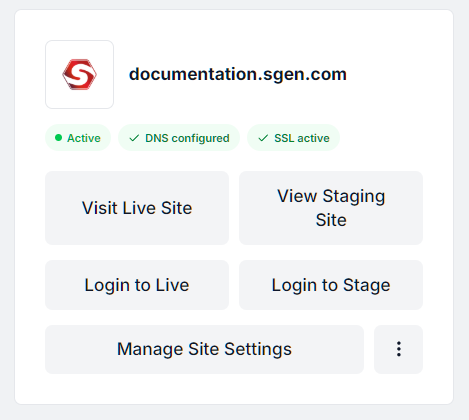
Use these when you need to open or access the production environment tied to the live domain.
Use these when you need to review or work on the staging environment before relying on the live site.
What staging is for
Staging is the environment you should treat as the working layer of the site. It is where you go when the site has been provisioned but public readiness is still being finalized.
Use staging for early access, structure review, setup, content preparation, admin checks, functional review, and controlled testing before the live domain is fully ready or before changes should be treated as production-facing.
What live is for
Live is the production environment. This is the environment intended for the actual public site and real domain experience.
Use live when the domain is pointed correctly, certificate provisioning has completed, and the site is ready to be treated as the public-facing environment.
What happens when a site is first created
When a site is created in SGEN, both environments are provisioned as part of the setup model. That does not mean both are immediately ready in the same way.
The working environment is provisioned so the site can be accessed and worked on early.
The production environment is also provisioned, but public readiness still depends on external conditions.
The live environment becomes properly usable once DNS is pointed correctly and certificate provisioning is active and complete.
The practical rule
Treat staging as the environment you can work in early. Treat live as the production environment that becomes fully dependable once domain and SSL conditions are ready.
A site card can exist, and both environments can be provisioned, while the public live domain still needs DNS and certificate completion before it should be treated as fully ready.
A common misunderstanding to avoid
Users often assume that once a site appears in Site Manager, the live domain should already behave like the finished public site. That is not always the case.
Being able to open staging or log into the site does not automatically mean the public live domain is already available under final production conditions.